NCCD360 Just Got Better: Explore the Latest Enhancements

Discover the latest NCCD360 enhancements designed to streamline everyday tasks, improve visibility across records and create a more seamless and collaborative experience for school staff in this post.

1. New Guidance Feature

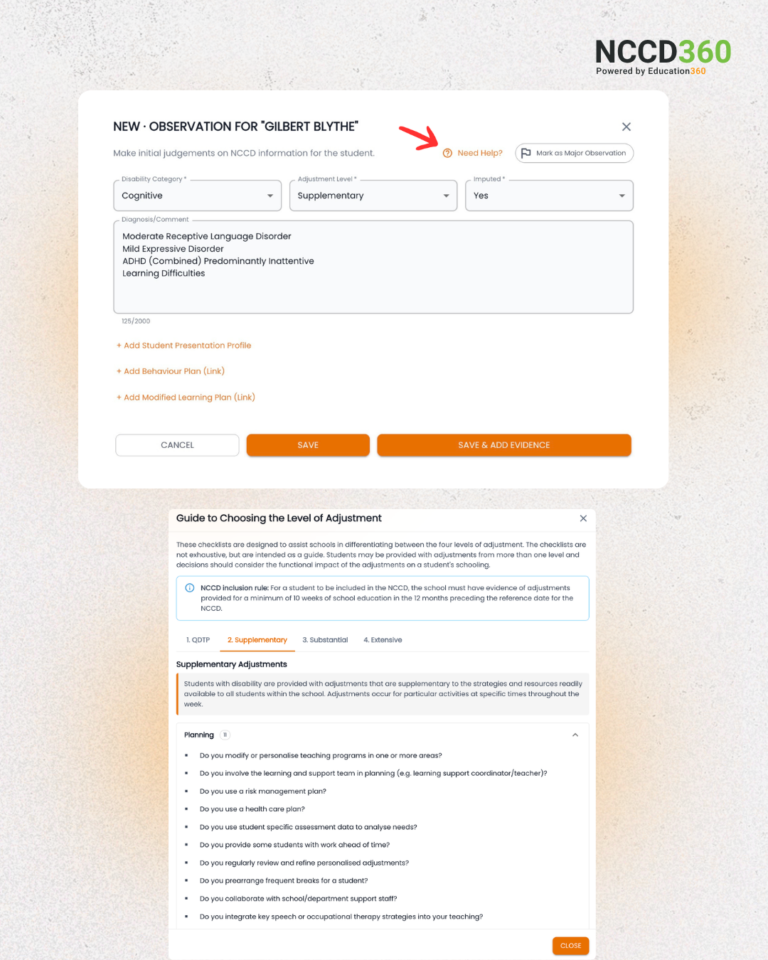
Determining the right Level of Adjustment for students is now easier with our new Need Help feature. Accessible from the Observation screen, staff can instantly access a guided checklist outlining the differentiation and support requirements across all four Levels of Adjustment.  

The feature is designed to improve consistency, clarity and confidence when making NCCD adjustments.
2. Student Presentation Profile

We’ve introduced Student Presentation Profile within Observation, now automatically included in the IEP (Individual Education Plan) Template.  

This feature provides a holistic and up-to-date view of each student, including strengths, challenges, academic progress and their social, emotional and functional capabilities.

By bringing all key information together in one place, schools can more easily link student needs to functional impacts, supporting informed decisions-making, targeted planning and evidence-based adjustments.

3. Functional Impact Categories

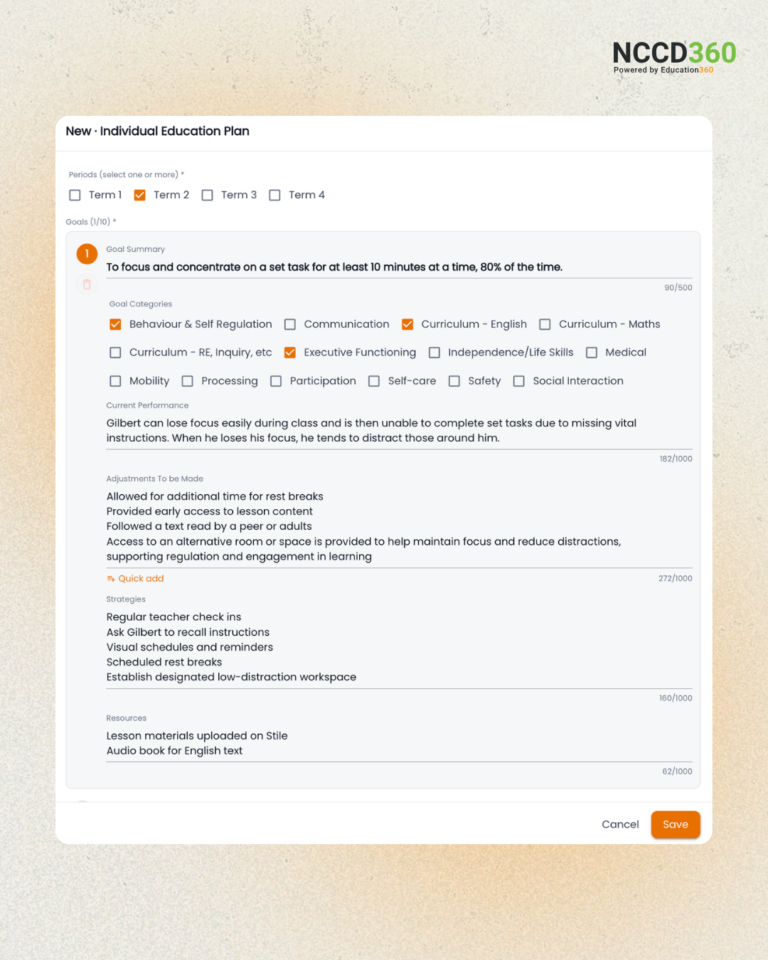
To further improve workflow and visibility, we’ve introduced Functional Impact Categories within the IEP.

This enhancement allows staff to directly link Functional Impact areas to IEP goals and adjustments within a single structured template, reducing the need to switch between multiple systems.

The IEP now centralises student goals, current academic performance and targeted adjustments into one connected view, making documentation more consistent and collaboration across teams more efficient.

By aligning learning goals and strategies with key functional areas such as communication, participation, behaviour and curriculum access, staff can plan, monitor and review student progress with greater clarity and confidence.
4. Capturing Student Voice in Consultation and Collaboration

NCCD360 now enables staff to capture meaningful consultation conversations between teachers and students directly within the IEP process.

This feature allows student perspectives, reflections, and experiences to be accurately documented and linked to specific IEP goals and adjustments, strengthening the connection between planning, support strategies, and functional skills development.

By incorporating student voice more seamlessly into documentation workflows, schools can support a more collaborative and student-centred planning approach.

Empowering schools with smarter documentation, clearer visibility, and more connected student support.

With these latest enhancements in NCCD360, schools can now benefit from a more unified and connected documentation process. Together, they are intentionally introduced to enhance visibility and support more efficient collaboration across teams.


ICT in Schools Summit 2026: Conversations That Matter for the Future of Education

Last week, the team from 9X5 Consulting attended the ICT in Schools Summit 2026 at Marvel Stadium, showcasing how solutions like Education360 are helping schools simplify operations, strengthen visibility and create more connected learning environments, alongside our partners at ManageEngine.

Bringing together ICT leaders, principals, digital learning teams and education technology providers from across the K–12 sector, the summit focused heavily on the evolving role technology now plays in supporting both operational efficiency and student outcomes.

Across the day, one thing became very clear: schools are navigating a rapidly changing digital landscape, and the conversation is no longer just about adopting new technology, it’s about implementing the right technology strategically, securely and sustainably.

The Key Conversations Across the Summit

AI in Education: Opportunity vs Responsibility

One of the biggest themes throughout the summit was the rapid evolution of AI within schools. Discussions explored how schools are beginning to integrate AI into teaching, learning and administration while also navigating the challenges that come with it. There was a strong focus on responsible implementation, governance, policy development and ensuring schools are prepared for long-term AI integration without compromising cybersecurity, compliance or operational stability.

A major takeaway from these conversations was that many schools are currently trying to balance the excitement around AI capabilities with the practical realities of managing risk, protecting data and maintaining clear operational frameworks.

Aligning Technology With Educational Outcomes

Another major focus throughout the summit was ensuring technology investments genuinely support educational outcomes rather than becoming disconnected from classroom needs.

Sessions explored how schools are approaching digital ecosystems, cloud infrastructure, operational visibility and data-driven decision making, while also navigating the increasing complexity of managing multiple platforms, applications and devices across campuses. There were also important conversations around responsible parent engagement with technology and the growing challenge of “shadow IT” within school environments.

Many ICT leaders spoke about the need for stronger alignment between operational systems, teaching environments and long-term strategic planning.

Cybersecurity Continues To Be Front Of Mind

Cyber resilience also remained a central theme across the summit.

As schools continue expanding their digital infrastructure, many leaders are reassessing how they manage access control, device management, threat monitoring, governance and long-term security planning. The conversation has clearly shifted beyond reactive IT support toward proactive risk management and long-term operational resilience.

A Valuable Day Connecting With The Education Sector

Events like the ICT in Schools Summit are important because they create space for practical, honest conversations around the real challenges schools are facing today.

It was fantastic to connect with so many educators, ICT professionals and school leaders throughout the day, and to hear firsthand how schools across Victoria are approaching digital transformation, AI adoption and operational innovation.

A big thank you to everyone who stopped by to chat with the 9X5 and ManageEngine teams. We’re proud to continue supporting schools through secure, practical and people-focused technology solutions and we’re already looking forward to the next conversation.

Student Transfer Is Here: Making NCCD Evidence Sharing Seamless

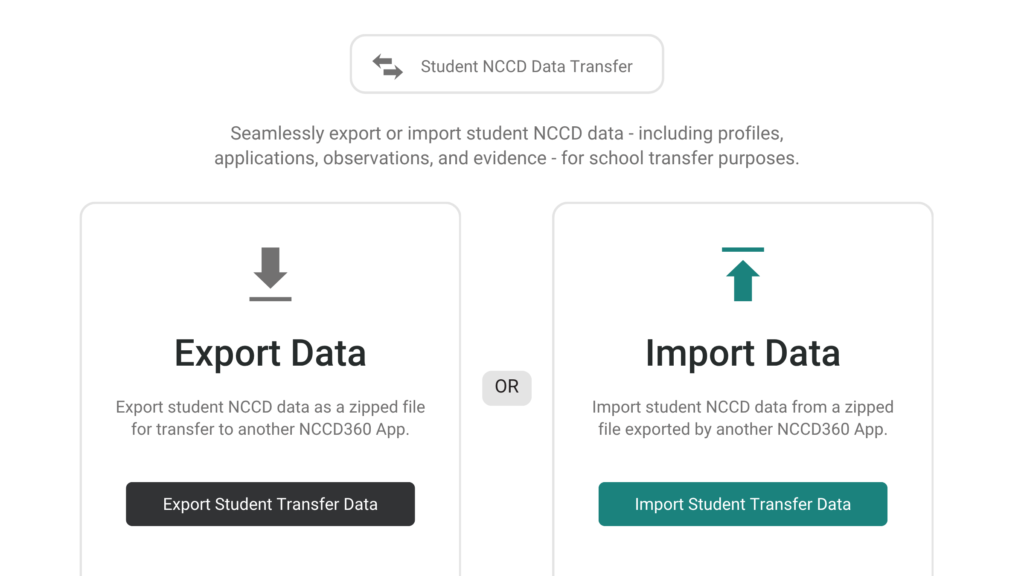
With the introduction of NCCD360 new Student Transfer feature, teachers and school leaders no longer need to navigate the challenges of unsynchronised NCCD evidence when students move between schools. Designed to support smoother, more consistent transitions, Student Transfer ensures critical student information travels with them, accurately, efficiently, and in step with frequent student movement.

So, what does this mean in practice?

Inside NCCD360, schools can now upload complete student records in a single click, seamlessly transferring existing NCCD evidence without manual searching, re-entry, or duplication. This simplifies the evidence management process, reduces administrative workload, and minimises the risk of fragmented or missing data.

The result? A more streamlined and reliable approach to NCCD record-keeping, saving time for educators while enabling greater accuracy and stronger, more consistent applications across schools.

One click. Total control. Seamless transitions.
With the new Export Data feature, teachers and school leaders can export student records instantly, staying in full control of exactly how many students to upload.

Built to address inconsistencies in data transfer, Export with Files feature consolidates all key student information, including attachments and supporting evidence, into a single ZIP file. This creates a complete, connected view of NCCD records as students move between schools.

For destination schools, student profiles are presented as cards, with data integrity verified at a prior checkpoint before transfer. Student Transfer not only simplifies the movement of records but also ensures consistency and accuracy by identifying and reducing duplication across systems. The result is trusted, ready-to-use data from the moment it arrives.

There's even more to like

  • Every export includes a checksum, NCCD360 automatically verify data before import, with warnings for any records that fail validation.
  • Decisions made at Match & Confirm stage can be reviewed and undo before importing.
  • Only approved applications are included in exports.
  • Duplicate Student IDs are detected and automatically merged into a single card.

Student Transfer doesn’t just simplify information movement, it keeps NCCD evidence continuously synchronised, accurate, and high-quality through built-in verification.

Where data moves effortlessly, Education360 simplifies student transitions, saving time, reducing admin, and keeping organisations stay connected.